BP2AI - Unreal Blueprint to Text
Ai excels at text analysis but can't read visual Blueprint graphs efficiently at scale till now.
BP2AI solves this by converting Blueprint Logic and Data Flow into accurate AI-Readable Text,
enabling instant context transfer to AI Large Language Models under your control.
What is the BP2AI Translator?
A Precision Translator, Not a Code Generator.
✅ WHAT BP2AI IS:
- Blueprint-to-text translator
- Accurate logic & Data representation
- Complete context provider for AI analysis
- Works with any reasoning AI
❌ WHAT BP2AI IS NOT:
- Automatic Blueprint node generator
- Magic black box code fixer
- Development decision maker
- One-click conversion system
⚙️ How It Works ⚙️
BP2AI Translator reads your Blueprint execution & data flow—every node, data connection, logical branch—and converts it into structured text that gives AI complete context for informed analysis.

Supercharge your Blueprint Workflow
and save Hours on...
Debugging
AI finds logical inconsistencies, edge cases, and architectural flaws
that are easy to miss in complex nested systems
- Dramatically reduces debugging time
- Identify logic inconsistencies instantly
- Deep insights into complex & nested Blueprint flows
- Professional code review assistance
Documentation
Transform tedious manual documentation into efficient, AI-assisted technical specs that stay current with your logic
- Transform any Blueprint into clear technical docs
- Save hours on knowledge transfer materials
- Automate documentation
- Create onboarding materials for complex systems
C++ Refactoring
Get guided C++ conversion with architectural control. AI suggests implementations while you specify requirements and constraints.
- AI-assisted Blueprint to optimized C++ conversion
- Selective refactoring with precise control boundaries
- Maintain exact logical equivalence
Output Overview
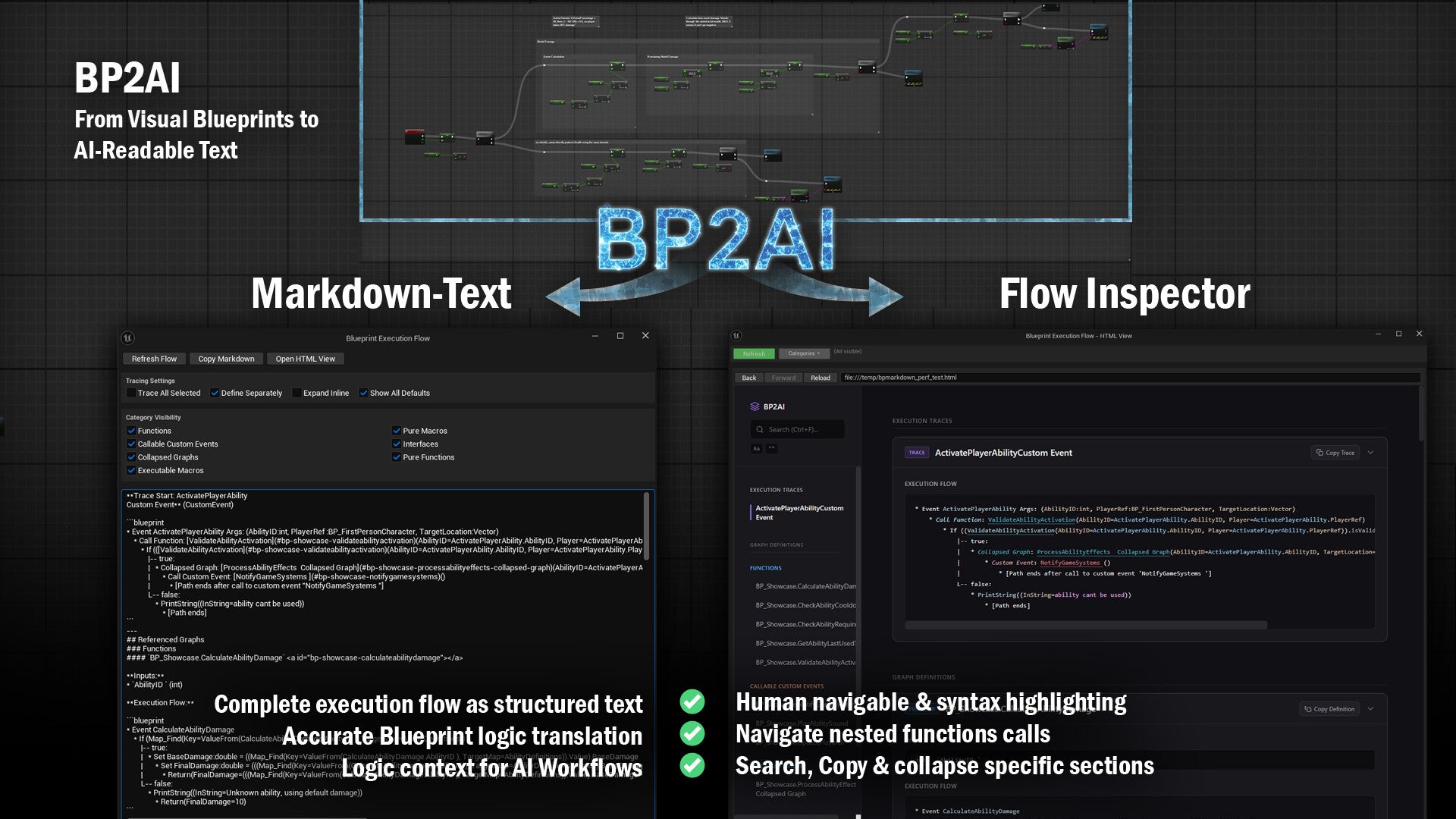
Flow Inspector
Navigate your Blueprint execution flow with interactive visual interface and targeted analysis capabilities.
Key Features:
Interactive Navigation - Click through complex nested functions with quick anchor links
Syntax Highlighting - Color-coded Blueprint elements for enhanced readability
Search & Filter - Find specific functions, events, or execution paths instantly
Focused Section Copying - Copy individual function definitions for targeted AI analysis or documentation
Collapsible Sections - Expand/collapse to focus on specific parts of your Blueprint logic
Perfect For:
Targeted Analysis - Copy specific functions to ask AI about individual components
Visual Navigation - Browse complex nested systems with clickable links
Focused Documentation - Generate docs for specific functions rather than entire systems
🔧 Technical Features & Accuracy 🔧
Complete Blueprint analysis with precise pin resolution and execution flow reconstruction
🔍 Core Analysis Engine
Advanced recursive tracing system that performs deep static analysis of Blueprint execution and data flow paths with cycle detection and context-aware processing.
✓ Recursive Pin Resolution (level depth adjustable)
✓ Multi-level & Nested Function/Macro Crawling
✓ Complex Symbolic Expression Tracing
✓ Complete Data Flow Mapping
✓ Execution Path Reconstruction
⚡ Flow & Control Structures
Complete support for all Blueprint control flow patterns including branching, looping, sequencing, macros, and complex nested execution paths with accurate flow reconstruction.
✓ If/Then/Else Branching
✓ Switch Statements (Enum/String/Name/Int)
✓ Loop Constructs (For/ForEach/While)
✓ Execution Sequencing & Gates
✓ Macros (User & Engine) Pure & Impure Handling
✓ Collapsed Graphs
📊 Functions & Event Handling
Multi-level graph analysis supporting functions, custom events, Blueprint interfaces, comprehensive event binding, and delegate systems with complete hierarchy traversal.
✓ Functions, Parent Function & Custom Events
✓ Blueprint Interfaces & Multi-Graph Dependencies
✓ Event Binding & Delegates
✓ Timeline Integration
✓ Input Events (Standard & Enhanced)
✓ Component & Actor Events
🔢 Data Types & Math
Comprehensive support for all Unreal Engine data types, containers, mathematical expressions, logical operations, and type conversions with accurate symbolic representation.
✓ All UE Primitive Types
✓ Core UE Structs (Vector, Rotator, etc.)
✓ Containers (Arrays, Maps, Sets)
✓ Custom Structs, GameplayTags & DataTables
✓ Mathematical Expressions
✓ Logical & Comparison Operators
🆕 NEW IN V2.1:
Whole-Blueprint Export:
right-click any Blueprint in the Content Browser → "Export Blueprint to Markdown".
View with selectable sections: Components, Variables, Event Dispatchers, Class Defaults, and all Graphs (every event/function/macro exactly once).
Works with Widget Blueprints (adds Widget Tree), Anim Blueprints (adds Pose Flow), GAS, function/macro libraries. Multi-select supported.
Command-line batch export:
Export Blueprints as text directly from the command line, no editor session needed. Same Blueprint always produces the same text, so you can put your Blueprint logic in version control and see exactly what changed between commits. Ideal for CI and automated diff workflows.
🆕 NEW IN V2.0:
-
✓ AnimGraph & PCG Graph Analysis (Beta): parse Animation Blueprint and PCG graphs into structured AI-readable text
-
✓ Class Defaults Export: export default property values from any Blueprint, GAS ability, Editor tool, or data-driven asset class
-
✓ DataTable & DataAsset Export: right-click any DataTable, DataAsset, or PrimaryDataAsset in the Content Browser to expose its content as text
-
✓ Adjustable Trace Depth: dual independent depth controls for pin chain resolution and execution flow traversal
Use Cases
✅ PERFECT FOR:
- Debugging complex nested systems
- Code review and quality assurance workflows
- Consistent technical documentation
- Blueprint to C++ migrations
- Legacy system analysis and maintenance
- Understanding inherited or complex Blueprint logic
❌ NOT FOR:
- One-click Blueprint node generation
- Black box "magic fix" solutions
- Automated decision-making workflows
- Non-Blueprint graph types (Anim, Material, PCG, Niagara)
📖 Effective Usage Guide 📖
Effective AI assistance requires two things:
Accurate context + guided prompts
BP2AI provides complete Blueprint context - You control the analysis through guided prompts and architectural requirements.
BP2AI Context ✓ + Your guided Prompts = Quality Results
For Debugging:
✅ "Analyze this ability system trace for edge cases in cooldown calculations and potential race conditions...."
❌ "Fix my Blueprint" (no context)
For Documentation:
✅ "Generate technical documentation following our team format: overview, key functions table, setup requirements, Quick Start...."
❌ "Document this" (no structure)
For C++ Conversion:
✅ "Convert to UE component with event delegates, no networking, optimized for local gameplay calculations....."
❌ "Make this C++" (no architectural guidance)

❓ FAQ ❓

Add comment
Comments
i also just purchased and would love a mac version
Hi, I purchased this and didn't realize it was only for Windows. You mention to reach out to you for the Mac version, could I get that please!
Pui, excellent proposal. Thank you for the feedback. I pushed a new Version :)
🆕 NEW IN V2.1:
Command-line batch export:
Export Blueprints as text directly from the command line, no editor session needed. Same Blueprint always produces the same text, so you can put your Blueprint logic in version control and see exactly what changed between commits. Ideal for CI and automated diff workflows.
Whole-Blueprint Export:
right-click any Blueprint in the Content Browser → "Export Blueprint to Markdown".
View with selectable sections: Components, Variables, Event Dispatchers, Class Defaults, and all Graphs (every event/function/macro exactly once).
Works with Widget Blueprints (adds Widget Tree), Anim Blueprints (adds Pose Flow), GAS, function/macro libraries. Multi-select supported.
Is it possible to export specific Blueprints to a text format using a Commandlet?
Additionally, I'm looking to automatically generate commit messages based on the diffs. Do you think it’s possible to achieve high-quality commit messages from Blueprint differences?
Thank you for the update, and for addressing our feedback!
This should make BP2AI much easier to use.
Thank you Kazu and James. I updated the BP2AI Plugin with a lot of new changes. I added AnimGraph & PCG graph analysis (Beta). Class Defaults export for Blueprints, GAS, tools & data assets. DataTable & DataAsset text export via right-click. Dual trace depth controls for deeply nested graphs.
But I also addressed your concerns specifically:
Node names now match what you see in the editor. For example:
- Before: FMin(A, B) → After: MIN(A, B)
- Before: K2_SetTimerDelegate(...) → After: Set Timer by Event(...)
The FInterpTo Target pin is no longer dropped
Argument order now matches the pin order on the node in the editor.
And Function Entries are now also labeled correctly. Thank you for your valueable feedback!
What stays the same by design:
BP2AI traces data flow, not graph structure. Pure/getter nodes are inlined into the expression at each use rather than listed separately.
Hello,
Thank you for building BP2AI. I wanted to share some feedback after using it extensively for actual Blueprint debugging and revision work.
At the moment, I am running into too many mismatches between the BP2AI output and the actual Blueprint graph, to the point that it becomes difficult to use the output as a reliable reference for debugging or for communicating edits to someone else.
The main issues are:
1. The node names in the output often do not match the node names shown in the Blueprint editor.
For example, nodes that are visibly MIN / MAX in the graph are described as FMin / FMax in the exported output, and Set Timer by Event is described as K2_SetTimerDelegate. This makes it much harder to map the output back to the real graph and identify which node should actually be edited.
2. Function / Event classification is not reliable enough.
For example, something that is clearly exported as a FunctionEntry can still appear in the body as “Event DoAttack,” which is misleading when trying to locate the real implementation in Blueprint.
3. The output tends to expand internal expressions instead of preserving the actual visible graph structure.
In practice, this means that intermediate nodes that are clearly present in the Blueprint editor become harder to identify in the text output, because the export favors internal-style expression expansion over the editor-facing structure.
4. Internal or engine-style naming is too prominent.
Names like K2_*, ValueFrom(...), and similar internal representations may be technically accurate, but they do not correspond closely enough to what a user actually sees in the editor. That makes the export much less useful for day-to-day Blueprint troubleshooting.
The practical problem is that these mismatches are large enough to cause real miscommunication. In my case, they already led to incorrect assumptions during debugging, because the exported text suggested a graph structure or node identity that did not actually match the Blueprint I was looking at.
I think the tool would become much more useful if it prioritized:
* the exact node names shown in the Blueprint editor,
* strict distinction between functions, events, and custom events,
* preservation of visible intermediate nodes,
* and less reliance on internal engine-style names in the default export.
I believe the tool has a lot of potential, but in its current state the mismatch between the exported representation and the actual Blueprint graph is too large for dependable debugging use.
Thank you for your work, and I hope this feedback is helpful.
Hi, I’m finding BP2AI very useful overall, especially for execution flow and reroute/shared-path tracing, but I found a specific export issue.
In UpdateCameraDistance, the exported text appears to omit the Target input pin on FInterpTo. In the actual Blueprint, that Target pin is wired from a Map Range Clamped chain driven by GetSpeed and related min/max variables. Because the Target pin is missing in the export, that whole upstream logic is also missing from the text, which changes the meaning of the function.
I’ve also noticed that reused pure/data nodes can sometimes be inlined as if they are re-evaluated multiple times, even when the Blueprint graph only calls them once and then reuses the result. That part is less serious, but the missing FInterpTo.Target pin seems like a real accuracy bug.
Overall I like the plugin, but could you please check whether FInterpTo input serialization is dropping the Target pin in some cases?
Thanks Kazu for the Proposals. I will contact you via mail for some more detailed Information.
“If I may point out a couple of small inconsistencies: BP2AI is a function, but it’s occasionally described as a Custom Event. Could we align the terminology there?”
“And regarding Set nodes: connecting a value into a Set doesn’t necessarily imply the logic is being evaluated twice—it’s typically just one value feeding the assignment. It might be best not to call it ‘double calculation’ unless there’s clear evidence.”